

A lot of people spend time adjusting their chair height, buying lumbar cushions, or upgrading to a better office chair, yet rarely think twice about the armrests. Are armrests good for ergonomics or do they create more problems than they solve? The answer is not as simple as yes or no because armrests can reduce strain when properly adjusted, but poorly designed or improperly positioned armrests can worsen posture and discomfort.
Key Takeaways
- Armrests are highly beneficial for ergonomics when they are fully adjustable, helping support your arms and shoulders.
- Armrests that are too high, too low, or too wide can encourage poor posture and reduce their ergonomic benefits.
- If armrests don’t fit your needs, options like adjustable forearm supports, keyboard trays, or active sitting chairs might work better.
What Do Armrests Actually Do?
Armrests are designed to support the weight of your arms so your neck, shoulders, and upper back don’t have to do all the work. When your arms are left unsupported for long periods, the muscles around your shoulders remain engaged to keep them elevated, which can contribute to fatigue, stiffness, and discomfort. Beyond improving comfort, armrests also encourage a more neutral sitting posture by helping keep your elbows close to your body and your shoulders relaxed. However, these benefits depend on correct adjustment.
Types of Armrests
Armrests aren’t a one-size-fits-all feature. They come in various designs, each offering different levels of adjustability and support. Understanding these variations is crucial for selecting an ergonomic chair that aligns with your specific needs and work habits.
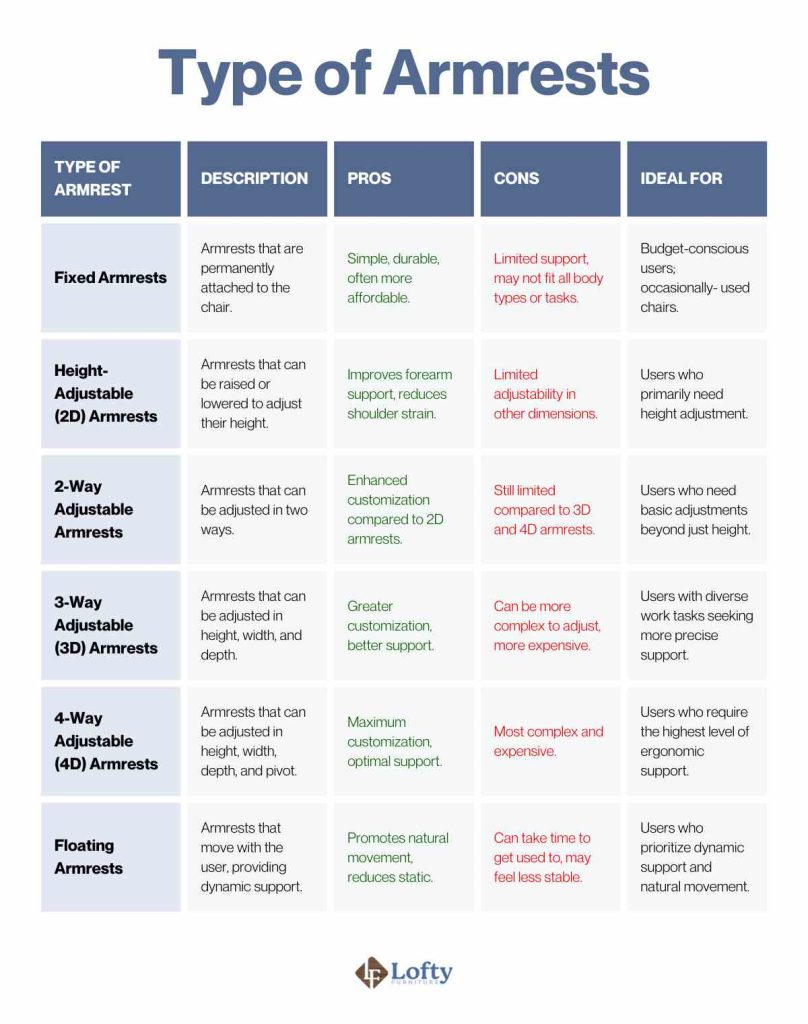
Fixed Armrests
Fixed armrests cannot be adjusted. They provide basic support for the forearms but may not fit every user’s body size or desk height, which can lead to shoulder or wrist discomfort if the positioning isn’t ideal.
Height-Adjustable (2D) Armrests
These armrests move up and down to support the elbows at the correct height. Many 2D models also allow the arm pads to pivot inward or outward, making them a good option for maintaining relaxed shoulders during typing and mouse use.
2-Way Adjustable Armrests
Two-way adjustable armrests typically offer height adjustment and either width adjustment or arm pad rotation, depending on the chair design. This added flexibility helps accommodate different body widths and work setups.
3-Way Adjustable (3D) Armrests
3D armrests usually adjust for height, width, and depth (forward and backward movement). This allows users to position their arms more naturally for typing, writing, or switching between different tasks throughout the day.
4-Way Adjustable (4D) Armrests
4D armrests provide the highest level of customization. They adjust for height, width, depth, and arm pad angle or pivot, allowing precise positioning to reduce strain on the shoulders, elbows, and wrists across a wide range of working positions.
Floating Armrests
Floating armrests are linked to the chair’s recline mechanism, moving with the backrest as you lean back. This helps keep your arms supported in both upright and reclined positions, making them particularly comfortable for users who frequently shift between focused work and relaxed sitting.
The Pros of Using Ergonomic Armrests
When implemented correctly, armrests can significantly enhance ergonomic comfort and promote a healthier workspace. Let’s explore the specific benefits that armrests provide.
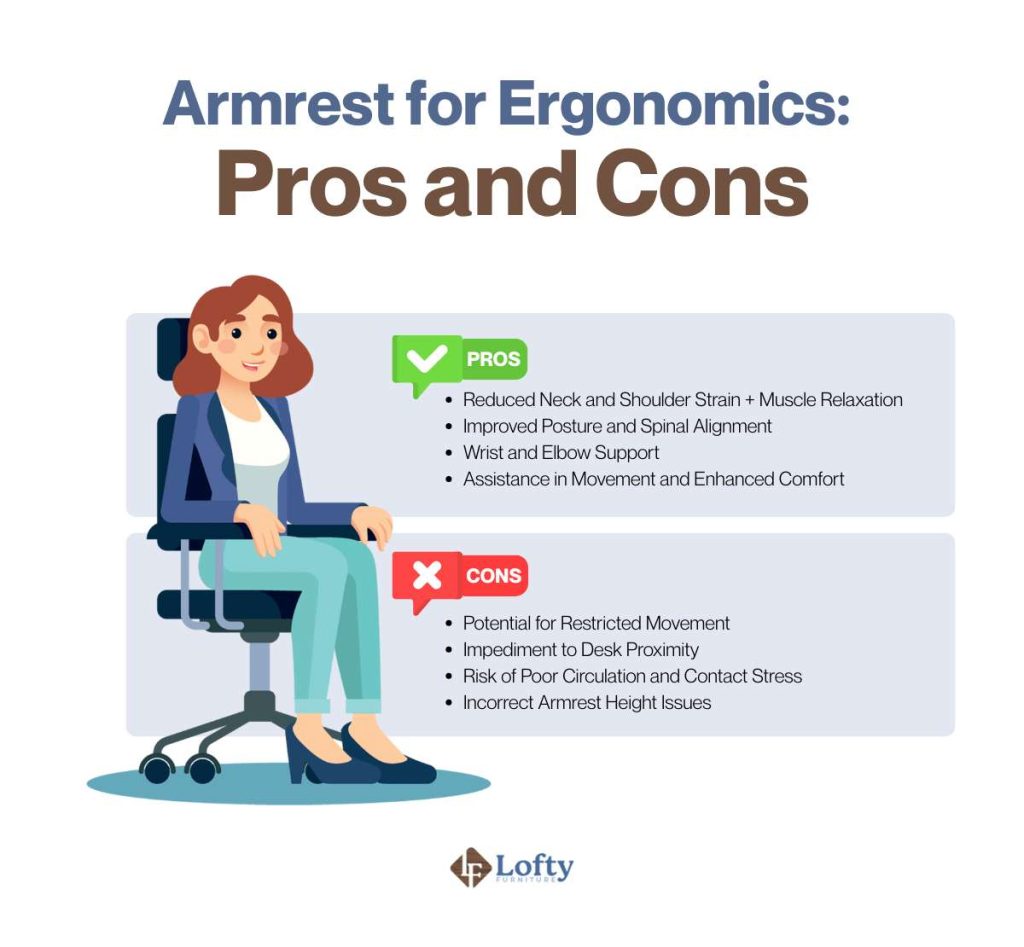
Reduced Neck and Shoulder Strain + Muscle Relaxation
Armrests play a crucial role in redistributing the weight of your upper limbs, effectively transferring it away from the neck and shoulders. Research has shown that consistent forearm support using chair armrests can significantly mitigate musculoskeletal disorders.
Better Posture and Spine Health
Proper armrests help support a more neutral sitting posture by reducing the load on the shoulders and upper body. While armrests can contribute to better posture, they work best as part of an ergonomic setup that includes the correct chair height, lumbar support, and monitor placement. Together, these adjustments help promote proper spinal alignment and may reduce strain on the neck, shoulders, and back during prolonged sitting.
Wrist and Elbow Support
Supporting the forearms may reduce wrist and elbow pain, including conditions like carpal tunnel syndrome and tennis elbow. A study demonstrated that a moveable armrest arm support significantly diminishes critical wrist angles, leading to safer computer mouse use. This reduction in strain not only alleviates existing pain but also helps to prevent future injuries.
Longer Comfortable Work Sessions/Less Fatigue
When armrests are used properly, they help reduce discomfort, which leads to better focus and productivity. Without pain or strain, it’s easier to concentrate on what you’re doing. Plus, a comfy workspace has big mental benefits. It boosts your mood and helps cut down on stress.

The Downsides of Using Armrests
While armrests offer numerous ergonomic benefits, they can also present challenges if not properly used.
Potential for Restricted Movement
If armrests aren’t adjusted properly, especially if they’re too wide or too narrow, they can make it harder to move comfortably. When armrests are too wide, you might end up leaning to one side, and if they’re too narrow, it can force you into a cramped position. This makes it harder to move freely and can lead to stiffness and fatigue.
Trouble Getting Close to Your Desk
Non-adjustable or poorly placed armrests can make it hard to get close to your desk, causing you to sit in awkward, strained positions. If the armrests are stuck in one spot or in the wrong place, they can get in the way of your keyboard or mouse, forcing you to lean forward. That extra reach puts a lot of strain on your shoulders, neck, and back.
Risk of Poor Circulation and Contact Stress
Overly restrictive armrests can compress nerves and blood vessels, leading to poor circulation and contact stress or prolonged pressure on the forearms or elbows. This causes numbness, tingling, or pain in the arms and hands. This compression can disrupt blood flow and nerve function, potentially leading to long-term health issues.
Choosing and Using Ergonomic Armrests the Right Way
To get the most benefit from your chair, use this checklist when selecting and setting up your armrests:
Adjust them throughout the day. Reposition the armrests as you switch between tasks, such as typing, writing, or reclining, to maintain comfortable arm support and encourage movement.
Choose adjustable armrests. Height adjustment is the most important feature, while width, depth, and pivot adjustments provide a more customized fit.
Set the correct height. Adjust the armrests so your elbows rest at about a 90-degree angle with your shoulders relaxed, not shrugged or slouched.
Check the width and depth. Your forearms should rest comfortably with your elbows close to your sides, without forcing your arms inward or outward.
Look for adequate padding. Soft, supportive padding helps reduce contact stress and improves comfort during prolonged sitting.
Avoid using armrests as constant weight-bearing supports. Rest your forearms lightly instead of leaning heavily on the armrests, which can create pressure on the elbows and forearms.
For a visual guide on finding the correct position for arm support, you can watch this video:
Armrest Alternatives You Can Try
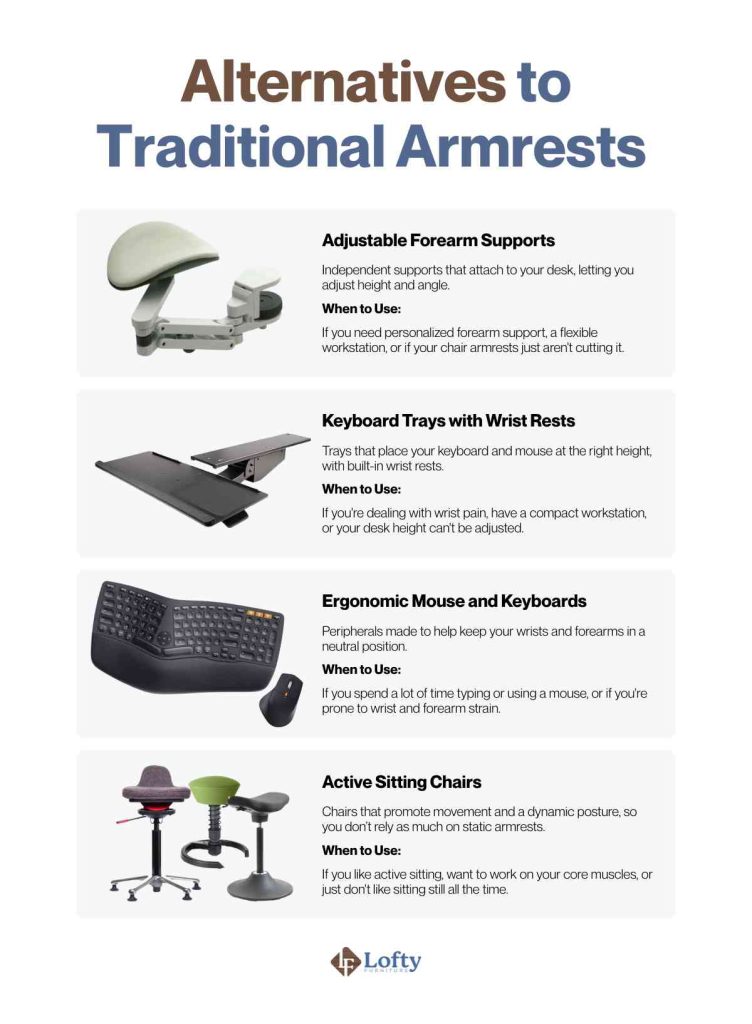
If your chair’s armrests aren’t adjustable or don’t fit your workspace, several alternatives can provide effective support. Adjustable forearm supports reduce shoulder strain by supporting your arms during computer work, while keyboard trays with wrist rests help position your keyboard at a more ergonomic height. Pairing these with an ergonomic keyboard and mouse can further encourage a more natural hand and wrist position. If you prefer greater freedom of movement, active sitting chairs or stools promote frequent posture changes instead of relying on armrests for support.
Tired of armrest limitations? Discover true comfort and support with our ergonomic chair featuring versatile 3-way adjustable armrests – explore the difference today!
Are Armrests Good for Ergonomics? The Final Verdict
In ergonomic comfort, armrests play a nuanced role. While they offer undeniable benefits in reducing strain and promoting proper posture, their effectiveness hinges on proper design and usage. Understanding the various types of armrests, their potential drawbacks, and the importance of adjustability allows you to make informed decisions about your workspace. Whether you opt for traditional armrests or explore alternative solutions, the key is to prioritize your individual needs and create a setup that supports your health and productivity.
Frequently Asked Questions
How high should my armrests be?
Your armrests should be positioned just below your elbow height, allowing your shoulders to relax. Ideally, your elbows should rest comfortably at a 90-degree angle.
Are adjustable armrests worth the investment?
Yes, adjustable armrests are generally worth the investment. They allow for personalized adjustments to match your body type and work tasks, significantly improving comfort and reducing strain.
Can armrests help with carpal tunnel syndrome?
Yes, properly adjusted armrests can help alleviate symptoms of carpal tunnel syndrome by supporting your forearms and maintaining a neutral wrist position. However, they are not a cure and should be used in conjunction with other ergonomic practices.
What is the best type of armrest padding?
Soft, supportive padding is generally best. Materials like memory foam or gel-infused padding can help reduce contact stress and enhance comfort. The best padding is one that is not too firm, and not too soft.
Are armrests better than no armrests?
Yes, adjustable armrests are generally better than none, since they support your arms and reduce shoulder strain. See the Pros section above for the specific benefits.
This is a very useful and practical explanation of armrests and ergonomics. I like how the article points out that armrests can be helpful when properly adjusted but may cause problems when they do not fit the user’s posture or workspace. The discussion about height, width, and alternative support options is especially helpful for people who spend long hours at a desk. Small adjustments can make a noticeable difference in everyday comfort. Clear guides like this are valuable for readers, just as Assignment Help Pk can provide students with useful support when managing demanding academic work.