
To fix common office chair height problems, start by identifying whether your chair is too high or too low and adjusting it so your feet rest flat on the floor, your knees are bent at about 90 degrees, and your hips are level with or slightly higher than your knees. An improperly adjusted chair can lead to back, hip, neck, and leg discomfort, poor posture, and reduced productivity. Understanding the signs of incorrect chair height and making the right adjustments can help create a more comfortable, ergonomic workspace and prevent strain during long hours of sitting.
Key Takeaways:
- Proper office chair height is essential for maintaining ergonomic posture, comfort, and overall physical well-being.
- Frequent issues include chairs that are too high or too low, non-adjustable chairs, inadequate lumbar support, and poor cushioning.
- Solutions to height-related issues range from using footrests and seat cushions to investing in adjustable chairs and height-adjustable desks.
This article explores the most frequent office chair height problems and provides practical solutions to help you sit comfortably and work efficiently.
Why Office Chair Height and Ergonomics Matter
The height of your office chair plays a role in maintaining ergonomic posture and overall comfort. When your chair is adjusted to the correct height, this ensures that your body weight is evenly distributed, reducing strain on your back, hips, and legs. Beyond chair height, other ergonomic factors—such as lumbar support, seat cushioning, and seat depth—significantly influence comfort and physical well-being. Sitting too low can cause you to hunch forward, leading to back and neck pain, while sitting too high can strain your legs and feet, causing discomfort and circulation issues.
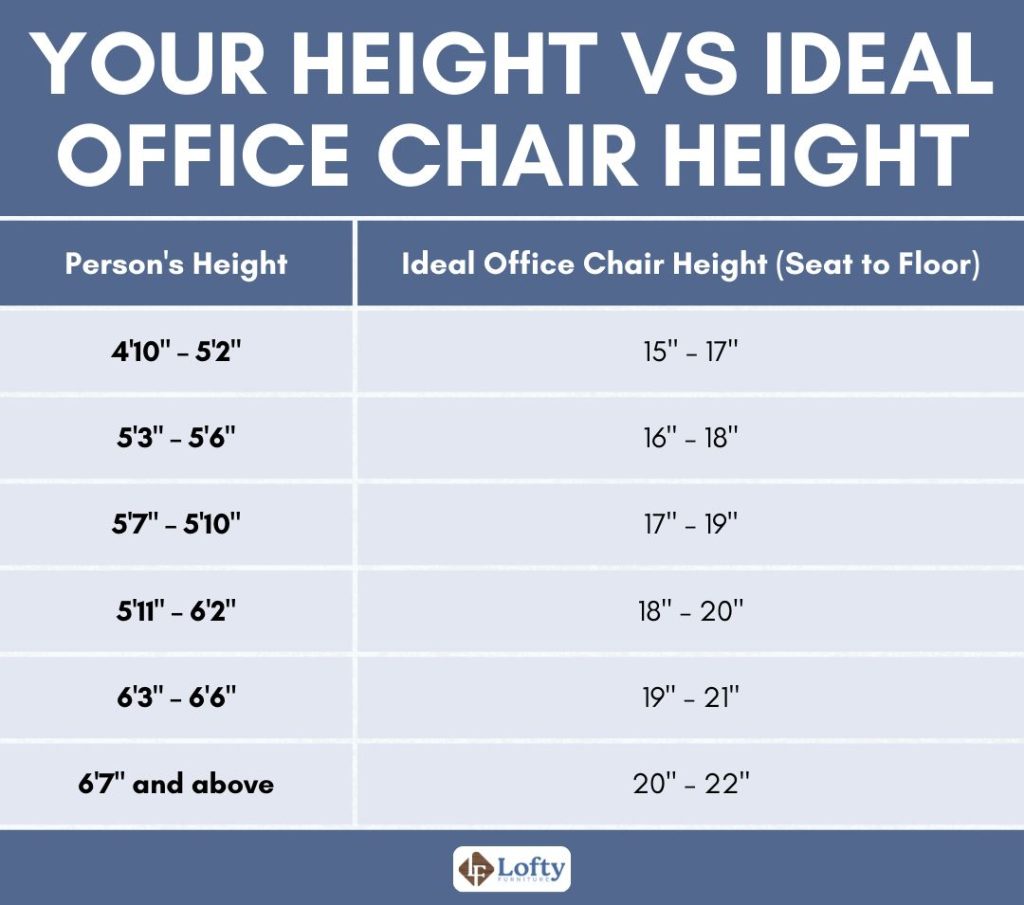
Here’s a table showing the recommended office chair height based on a person’s height range:
Common Office Chair Height Problems (and How to Fix Them)
Below, we’ll break down the most common chair height-related problems, starting with chairs that are too high.
1. Office Chair Too High
When your office chair is too high, your feet may not rest flat on the floor, reducing healthy blood flow. A case-control study published in the Journal of the Royal Society of Medicine found that prolonged work- and computer-related sitting was associated with a 2.8-fold higher risk of venous thromboembolism (VTE), including deep vein thrombosis (DVT).
Solution: A footrest can help maintain proper posture, reduce pressure on your thighs, and improve circulation. You can also adjust the chair’s height lever or invest in an ergonomic chair with height adjustment.
2. Office Chair Too Low
When your office chair is too low, your hips sit below your knees, causing your pelvis to tilt backward and placing extra strain on your lower back. Over time, this posture can contribute to chronic low back pain. A study published in the Journal of Electromyography and Kinesiology found that prolonged sitting and non-neutral seated postures increase stress on the lumbar spine, making proper sitting posture an important factor in reducing the risk of low back pain.
Solution: Raise the seat until your hips are level with or slightly higher than your knees while keeping your feet flat on the floor. If your chair doesn’t adjust high enough, use a firm seat cushion that raises your sitting height by 1–3 inches without compressing too much under your weight.
3. Non-Adjustable Chairs
Non-adjustable chairs make it difficult to achieve a proper ergonomic setup because you can’t customize the seat height, lumbar support, or armrests. As a result, you’re more likely to sit in an awkward position that can lead to poor posture and discomfort over time.
Solution: If replacing the chair isn’t an option, choose accessories that address its biggest shortcomings. Use a firm, high-density seat cushion that raises your sitting height without flattening under your weight, a contoured lumbar support cushion that fills the natural curve of your lower back, and a stable footrest if your feet no longer rest flat on the floor after raising the seat.
4. Inadequate Lumbar Support

A lack of proper lumbar support often leads to slouching and difficulty maintaining an upright posture. When the natural curve of the spine isn’t supported, it forces your lower back into an unnatural position. Over time, this can result in chronic lower back pain and increase the risk of more severe spinal issues, such as herniated discs or sciatica.
Solution: Research confirms that proper lumbar support significantly reduces the risk of lower back pain. To mitigate these issues, you can use an external lumbar cushion to provide support where your chair lacks it, or invest in an ergonomic chair with built-in, adjustable lumbar support.
5. Poor Cushioning
Insufficient cushioning in an office chair can lead to discomfort during prolonged sitting, with pressure points developing in the legs and hips. Over time, this lack of support results in muscle fatigue, making it harder to stay comfortable and maintain focus during long work hours. Poor cushioning also contributes to improper weight distribution, which can worsen posture.
Solution: Adding a memory foam seat cushion can provide extra padding and relieve pressure points. Alternatively, upgrading to a chair with high-quality, dense cushioning will offer better long-term comfort and support, helping to reduce muscle strain and maintain productivity.
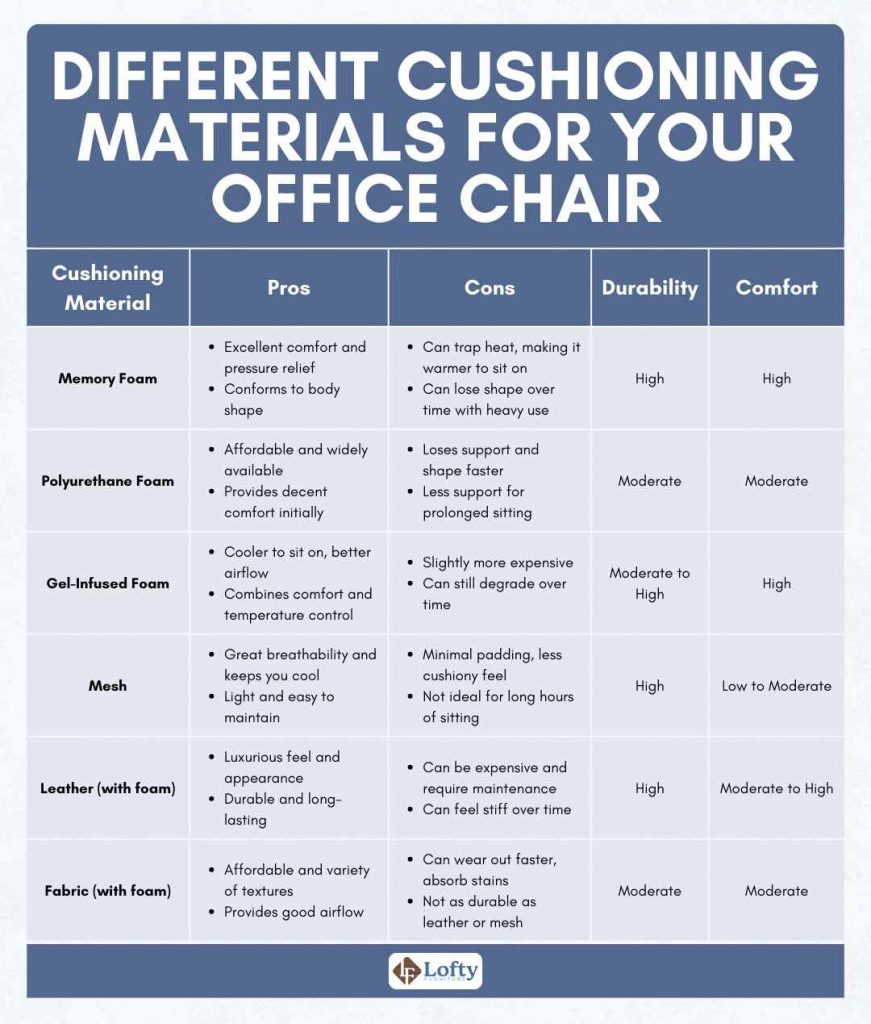
Here’s a comparison table of common office chair cushioning materials, evaluating them based on durability and comfort.
6. Insufficient Seat Depth
Insufficient seat depth in an office chair can lead to a lack of thigh support and improper weight distribution. When the seat is too shallow, it forces individuals to sit on the edge, causing strain on the hips and pressure behind the knees. Over time, this can result in hip strain.
Solution: Proper seat depth helps distribute your weight evenly while supporting your thighs without pressing into the backs of your knees. Look for a chair with adjustable seat depth so you can leave about 2–3 inches (5–8 cm) of space between the front edge of the seat and the back of your knees.
7. Desk and Chair Height Mismatch
A mismatch between desk and chair height can cause symptoms such as wrist strain and discomfort in the forearms. Over time, these issues may escalate into more serious conditions like carpal tunnel syndrome and other musculoskeletal disorders (MSDs), affecting overall productivity and comfort.
Solution: Research found that maintaining neutral wrist positions is crucial in preventing carpal tunnel syndrome. Consider adjusting your chair height or the desk height using risers. Opting for a height-adjustable desk can also provide a flexible solution.
Here’s a summary of the most common office chair height problems and how to solve them:
| Problem | Short-Term Effects | Long-Term Effects | Solutions |
| 1. Chair Too High | Legs dangling, pressure on thighs | Knee strain, poor posture | Use a footrest, adjust the chair height, or invest in an ergonomic chair with height adjustment options. |
| 2. Chair Too Low | Feet not flat on the ground, lack of thigh support | Musculoskeletal issues, lower back pain | Adjust the chair height, use a seat cushion, or consider a chair with height adjustment features. |
| 3. Non-Adjustable Chairs | Inability to find proper height, discomfort | Body misalignment, reduced productivity | Add a seat cushion, use lumbar support cushions, or invest in an ergonomic chair with adjustability. |
| 4. Inadequate Lumbar Support | Slouching, lower back pain | Chronic lower back pain, increased spinal issues | Use lumbar support cushions, or invest in a chair with built-in adjustable lumbar support. |
| 5. Poor Cushioning | Discomfort during long hours, pressure points | Muscle fatigue, reduced focus and productivity | Add memory foam seat cushions, or opt for a chair with high-quality cushioning. |
| 6. Insufficient Seat Depth | Lack of thigh support, improper weight distribution | Hip strain, pressure behind the knees | Choose chairs with adjustable seat depth, or use seat cushions for extra support. |
| 7. Desk and Chair Height Mismatch | Wrists too high or low | Wrist strain, carpal tunnel syndrome | Adjust chair height or desk height using risers, opt for a height-adjustable desk. |
How to Find the Correct Office Chair Height
A properly adjusted office chair should support your body in a neutral, comfortable position throughout the workday. Follow these steps to find the correct office chair height.
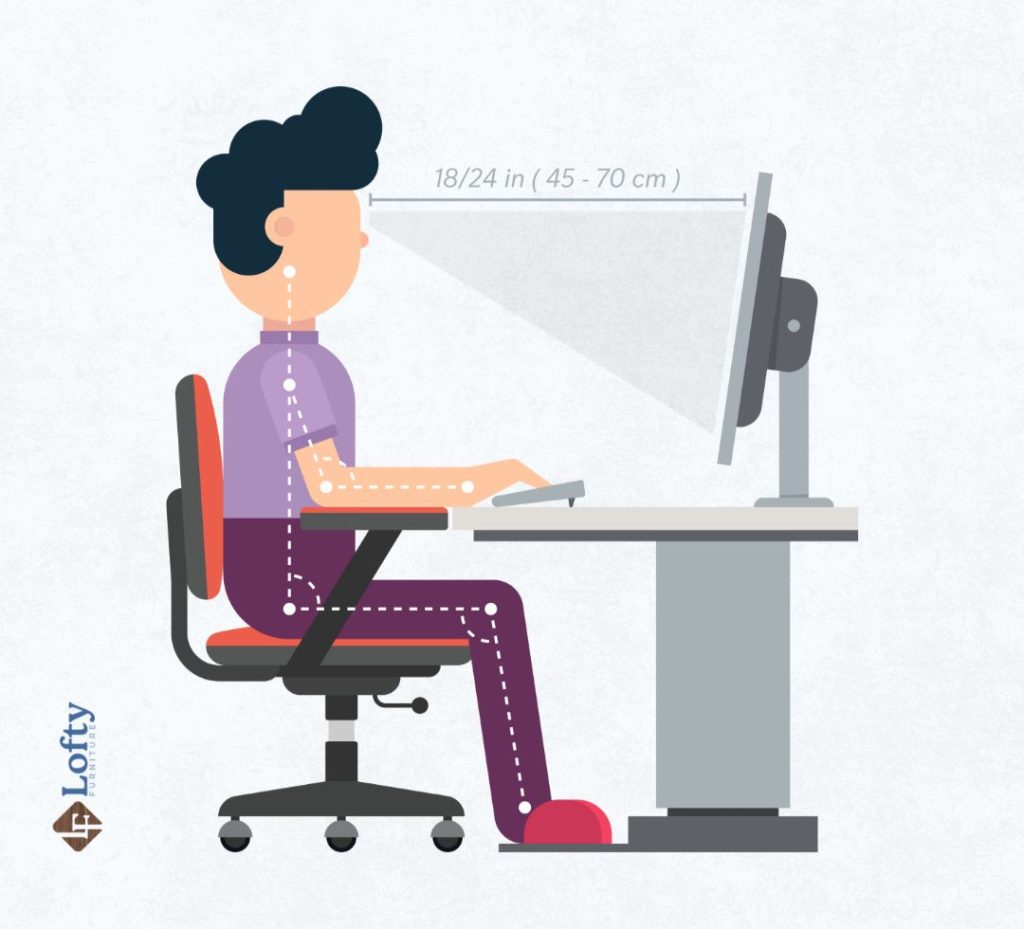
- Start with Your Feet: Sit all the way back in the chair and adjust the height until both feet rest flat on the floor. Your weight should be evenly distributed across your feet.
- Check Your Knee Angle: Your knees should be bent at approximately 90 to 100 degrees, with your thighs roughly parallel to the floor.
- Position Your Hips Correctly: Your hips should be level with or slightly higher than your knees. This position helps maintain the natural curve of your lower back.
- Adjust Your Elbows for Keyboard Work: With your shoulders relaxed, your elbows should rest at about a 90-degree angle while typing.
- Verify Monitor Height: After adjusting your chair, check your monitor position. The top of the screen should be at or just below eye level, allowing you to look straight ahead.
- Test Your Setup for 20–30 Minutes: Sit and work in your adjusted position for at least 20 to 30 minutes. If you notice pressure behind your knees, dangling feet, or lower back discomfort, make small adjustments until your posture feels natural and supported.
Transform your workspace with ergonomic office chairs that enhance comfort and productivity. Explore our top collection to elevate your work experience today!
Conclusion
Choosing the right office chair height and ensuring proper ergonomic support are vital steps in maintaining comfort and preventing long-term health issues. By addressing common problems related to chair height, lumbar support, and cushioning, individuals can create a workspace that promotes productivity and well-being. Investing time and effort into selecting an appropriate chair not only contributes to physical health but also supports a more focused and efficient work environment.
Frequently Asked Questions
Why does my office chair keep sinking after I adjust the height?
Your office chair keeps sinking after you adjust the height because the gas lift cylinder is likely worn out or has failed. The cylinder uses compressed gas to hold the chair at the selected height, but over time, its internal seals can wear down and cause the seat to slowly lower while you’re sitting. Check that the height lever and mechanism are working properly, and if the issue continues, replacing the gas lift cylinder is usually the most reliable fix.
How can I make my office chair higher if it doesn’t adjust enough?
You can make an office chair higher if it doesn’t adjust enough by adding a firm seat cushion, using a stable footrest to maintain proper leg alignment, or replacing the chair with one that offers a wider height adjustment range. A cushion can raise your sitting position by a few inches, but make sure it does not compress too much and that your feet can still rest comfortably on the floor.
Why does my office chair feel uncomfortable even at the correct height?
Your office chair may feel uncomfortable even at the correct height because other ergonomic factors, such as seat depth, lumbar support, cushioning, armrest position, and desk height, may not be properly adjusted. A chair that supports your body correctly should allow your feet to rest flat, your back to maintain its natural curve, and your shoulders and arms to stay relaxed while working.
I have a high chair but no desk, just a counter with no room to put legs.
This is essential reading for anyone buying office furniture. The height guidelines help you test chairs properly before purchase. When shopping for used furniture, bring these measurements with you. A chair that seems comfortable in-store might cause problems later if it doesn’t match your desk height or body proportions.
I appreciate how this addresses the chair-desk links. Many people blame their furniture when it’s really a mismatch. Used furniture buyers should always check if the chair and desk can work together. A great deal isn’t great if you need to buy additional accessories just to sit comfortably.
This guide proves that good furniture is about adjustability. When evaluating used chairs, test the full height range and check cylinder condition. Non-adjustable chairs are rarely worth buying, even at bargain prices. Your spine deserves furniture that adapts to you, not the other way around.