

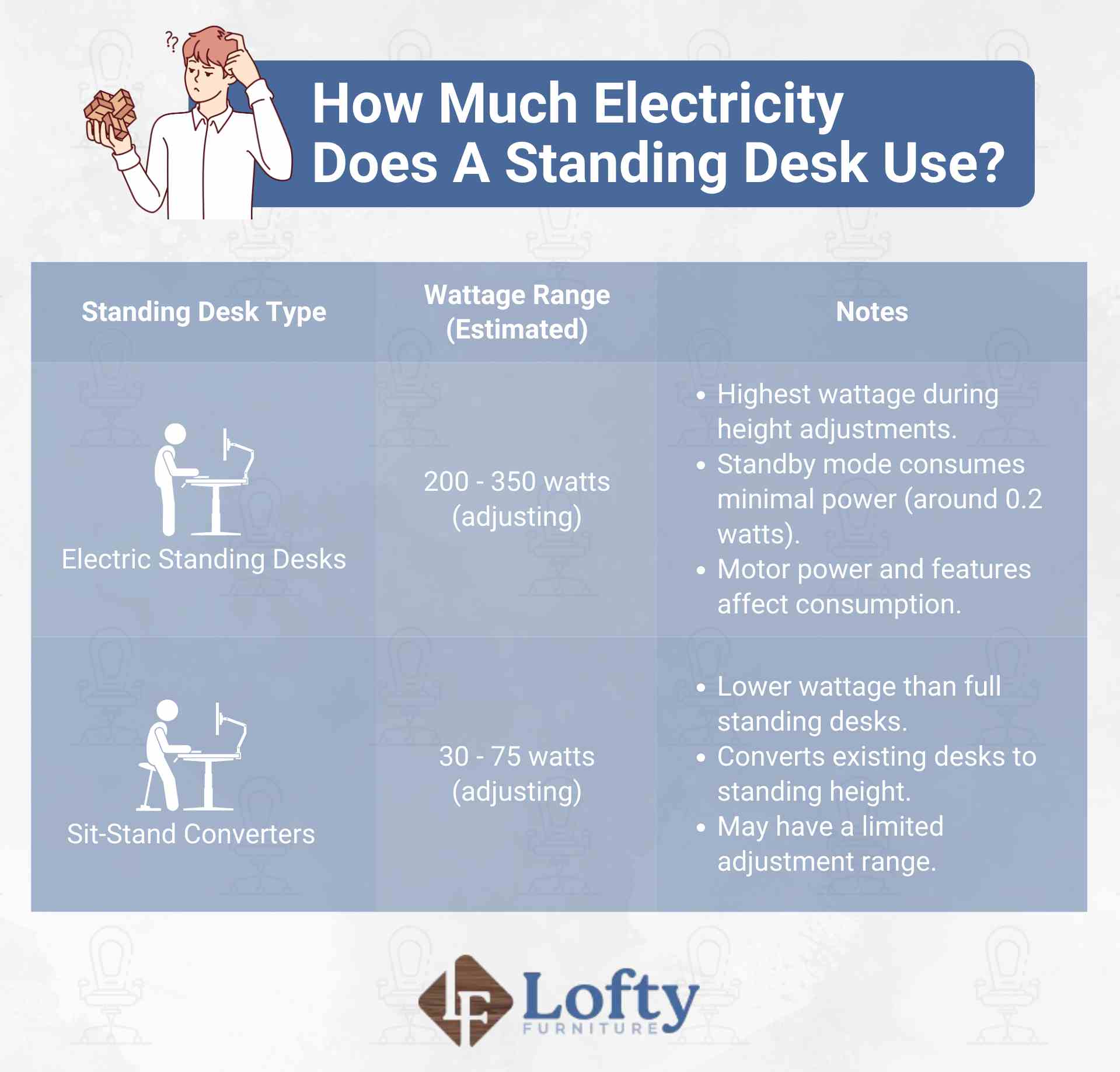
A standing desk is a height-adjustable desk that allows you to work while sitting or standing by raising or lowering the desktop. While it may seem like the last thing that would affect your electric bill, a standing desk does use a small amount of electricity when adjusting its height. Most electric standing desks draw around 200–350 watts while the motor is running and less than 0.5 watt on standby, though actual consumption varies by motor size, adjustment frequency, and features such as displays or memory presets.
Key Takeaways:
- The electricity usage of a standing desk is minimal, thanks to energy-efficient motors and standby modes.
- On average, standing desks use only 200-350 watts while adjusting and a mere 0.1 to 0.5 watts on standby.
- Exact standing desk electricity usage depends on the motor, frequency of use, and additional features.
Electric vs. Manual Standing Desks: What’s the Power Difference?
Manual standing desks use zero electricity. They operate entirely on mechanical adjustments, so you can switch between sitting and standing without drawing any power at all. Electric standing desks, on the other hand, use a motor to adjust height, which is where all their power consumption comes from. If saving electricity is your main priority, a manual desk is the more efficient choice, and it’s typically more affordable too, since it has no electrical components to build or maintain.
How Many Watts Does a Standing Desk Actually Use?
Most electric standing desks draw between 200 and 350 watts while the motor is actively raising or lowering the desktop. Single-motor desks tend to sit on the lower end of that range, while dual-motor models pull more power since they’re driving two lifting columns at once. This wattage only applies during the actual adjustment, which usually takes 10 to 15 seconds per movement.
Once the desk finishes moving and settles into position, power use drops dramatically. Most desks use somewhere between 0.1 and 0.5 watts on standby, just enough to keep the control panel display lit and remember your height settings. That’s a tiny fraction of what a phone charger left plugged in draws. In practical terms, the motor itself is where nearly all the electricity goes, and it only runs for a few seconds several times a day.
What Affects How Much Wattage Your Standing Desk Uses?
Not every electric standing desk pulls the same amount of power, even within that 200 to 350-watt range. A handful of factors determine where your desk lands, and understanding them can help explain why your energy use might look different from a coworker’s setup.
Motor type and brand
Single-motor desks generally use less power than dual-motor ones, since there’s only one column doing the lifting. Dual-motor desks draw more wattage but lift heavier loads more smoothly and evenly. Brand quality matters too — well-built motors run more efficiently, while cheaper, less efficient motors can end up drawing more power to do the same job.
Desk weight capacity and load
A desk’s weight capacity affects how hard the motor has to work. Desks rated for heavier loads typically have stronger motors that use more wattage to move the same distance, and a fully loaded desk with monitors and accessories makes the motor work harder than an empty one.
How often you adjust the height
The more times you raise and lower your desk in a day, the more total electricity you use. Someone switching between sitting and standing every hour will use noticeably more power over a month than someone who sets it once and leaves it — this is one of the few factors actually within your control.
Added features
Displays, memory height presets, USB charging ports, and under-desk lighting all draw a small amount of standby power around the clock. A digital display alone adds a bit to your standby wattage, and charging devices through the USB ports adds more.
Is a Standing Desk’s Wattage High Compared to Other Office Equipment?
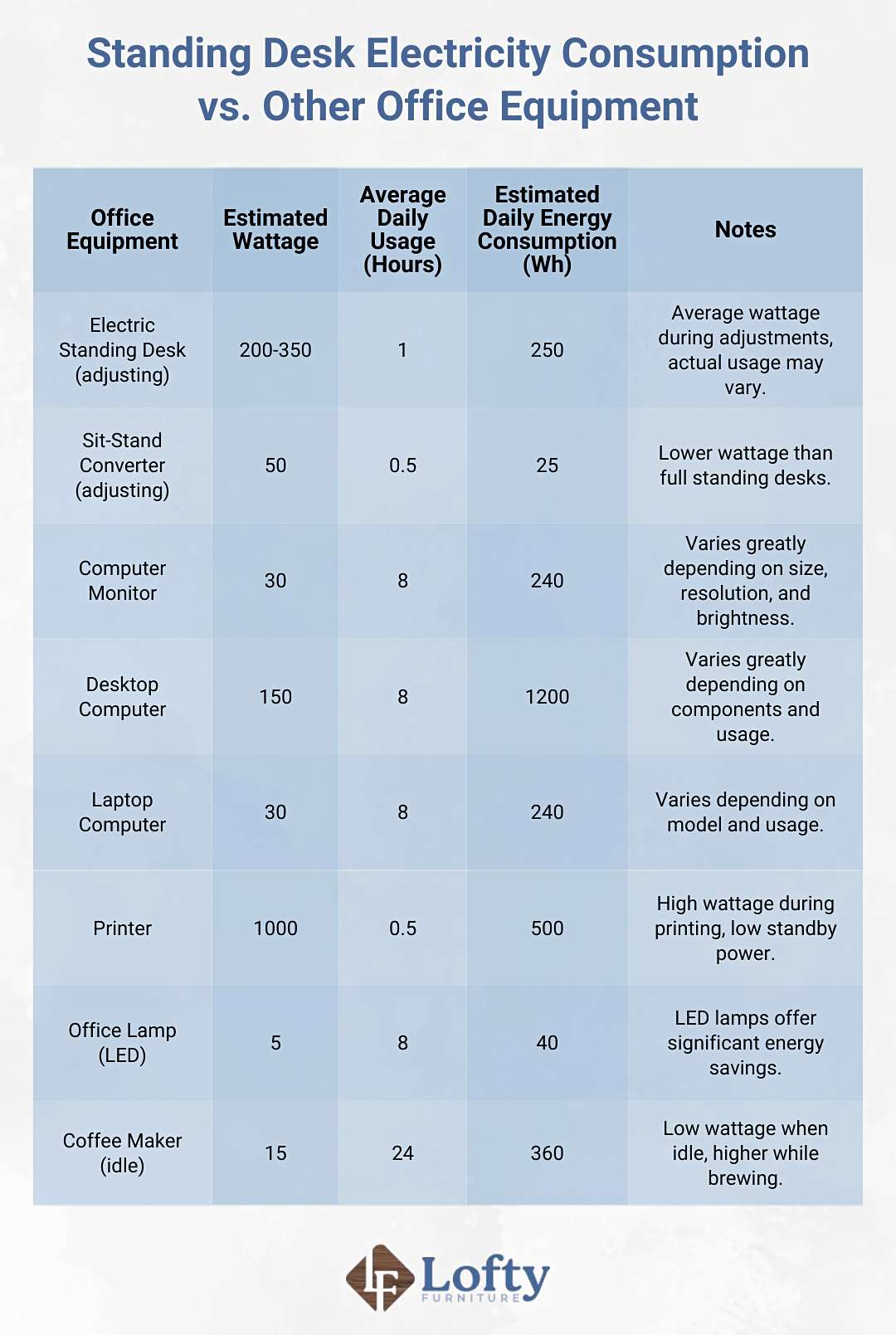
No, standing desks are far more energy-efficient than most other office equipment. A printer, for example, typically draws around 1,000 watts, which is three to five times more than a standing desk uses even during active adjustment. Standing desks also have lower standby power consumption than most other office equipment, making them one of the more energy-conscious pieces of furniture in a workspace.
What Features Help a Standing Desk Use Less Power?
Some standing desks go a step further with features designed specifically to cut down on power use. Smart sensors are one example, since they can detect when nobody’s at the desk and switch to a lower-power mode automatically. Built-in timers are another common addition, nudging you to switch between sitting and standing at set intervals so the desk isn’t adjusting more than necessary.
Manufacturers are also paying more attention to what goes into building these desks, not just how they run. Many now use recycled or recyclable materials, which cuts down on waste and lowers the energy footprint tied to production.
How Can You Reduce Your Standing Desk’s Electricity Use?
Even though standing desks already use very little power, a few small habits can shave off even more.
- Unplug or use a smart plug. If you’re stepping away for the day, unplugging the desk or using a smart plug with a timer cuts standby draw down to zero.
- Adjust less frequently. Instead of switching every 20 minutes, try setting a schedule like once every hour or two to reduce how often the motor runs.
- Use memory presets instead of manual adjustments. Presets get you to your exact height faster, which means the motor runs for less time per adjustment.
- Turn off the display when not in use. If your desk has a digital display, dimming or turning it off during idle hours reduces standby power.
- Skip unnecessary extras. Features like desk lighting or USB charging ports add to your baseline power draw, so only use them when you actually need them.
- Choose an energy-efficient model if you’re buying new. Look for desks with sensors, low standby wattage, or eco-conscious certifications if energy use is a priority for you.
If you’re shopping for a standing desk that combines energy efficiency with quality craftsmanship, explore our Amish-crafted adjustable desks today!
Conclusion: The Verdict on Standing Desk Electricity Costs
Standing desks draw about 200 to 350 watts while adjusting and less than half a watt on standby, a small enough amount that even daily use adds only a few cents a year to your electric bill. The exact number depends on the motor, the weight it supports, and how often you adjust the height. You can further minimize your electricity consumption by implementing simple strategies to reduce usage and contribute to a greener workspace.
Frequently Asked Questions
Is your standing desk draining electricity when not in use?
Yes, but only a tiny amount. Most standing desks draw somewhere between 0.1 and 0.5 watts on standby just to keep the control panel and memory settings active. Over a full year, that adds up to a very small cost, often just a few cents.
How many hours per day should I use my standing desk?
There’s no strict rule, but many health experts suggest alternating between sitting and standing every 30 to 60 minutes throughout your workday. A common approach is standing for about 2 to 4 hours total across an 8-hour day. This helps reduce the strain of prolonged sitting without overloading your legs and lower back from too much standing.
Do standing desks need to be plugged in all the time?
No, they don’t need to stay plugged in constantly. You can unplug the desk when you’re done for the day without damaging it or losing basic functionality. The only downside is that some desks may lose memory presets if they’re unplugged, depending on the model.
Rose Cabrera, this is a fantastic article!
Key takeaways:
Efficiency: A motorized standing desk uses minimal power: 200-350 watts when adjusting and watts on standby.
Cost Driver: The main energy cost is from the peripherals plugged into the desk.
Excellent context for eco-conscious buyers!
Hey,
A standing desk actually uses very little electricity since the motor only runs for a few seconds when adjusting height. In daily use, the power cost is almost negligible. It’s similar to casually browsing a menu page online like https://outbacksmenu.us/ the energy impact is tiny compared to larger appliances running all day.
Thanks for sharing!