
If you’ve ever stood up from your desk with a stiff lower back that builds throughout the day, you’re not alone. Most office setups look fine on the surface, but they encourage hours of sitting in positions your body was never designed to hold. That’s where lumbar support comes in. At its core, lumbar support is a small detail in a chair’s ergonomic design, but it has an outsized impact on how your body feels after a full workday.
Key Takeaways:
- Lumbar support is a chair feature that supports the natural curve of your lower spine.
- It helps reduce lower back strain and improve posture during long sitting hours.
- Lumbar support is most useful for people who sit for extended periods and need added back support for comfort.
In this article, we’ll take a closer look at what lumbar support actually is, how it works within an office chair, and the different types you’ll come across.
Understanding Lumbar Support and Why It Matters
The lumbar spine, or lower back, consists of five vertebrae (L1–L5) that naturally form a gentle inward curve called lordosis. This curve helps distribute body weight, absorb shock, and keep your upper body balanced over your pelvis. Research shows that lumbar lordosis decreases significantly when sitting compared to standing, and over hours of sitting, this reduction can contribute to discomfort and long-term back or musculoskeletal issues.
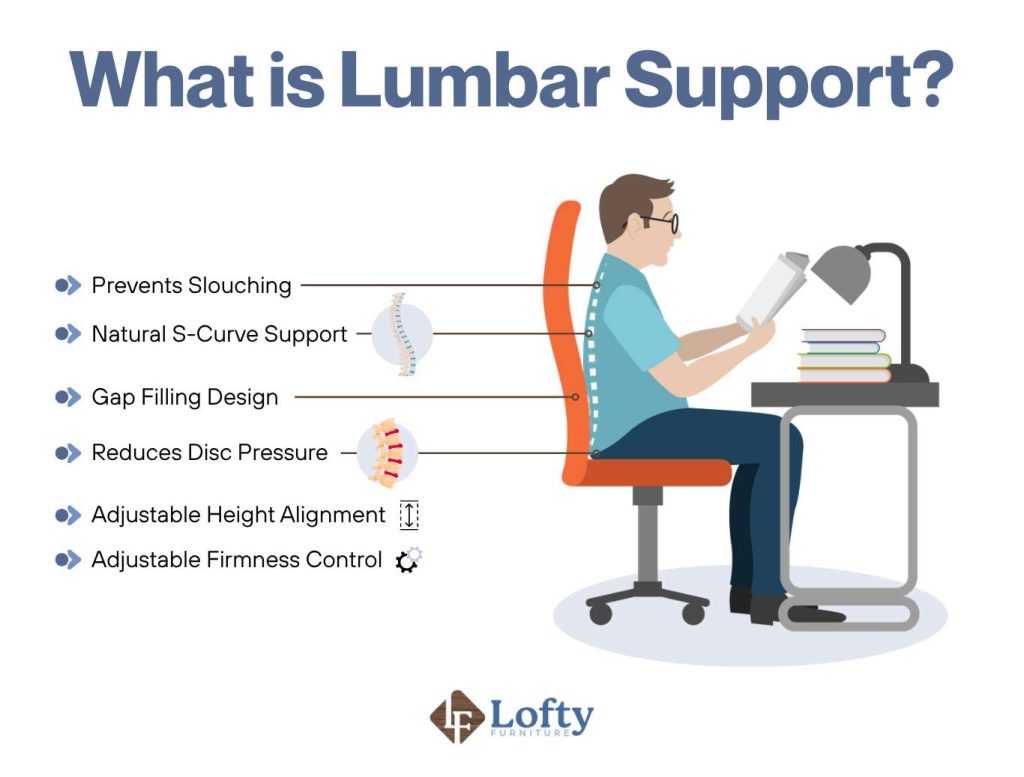
That’s where lumbar support in an office chair comes in. Designed to maintain the spine’s natural curve, lumbar support fills the gap between your lower back and the chair, helping preserve neutral posture without constant effort. Whether through a fixed cushion, adjustable pad, or dynamic system, proper support reduces strain on spinal discs and muscles, helping prevent fatigue, pain, and posture-related problems during prolonged sitting.
Types of Lumbar Support
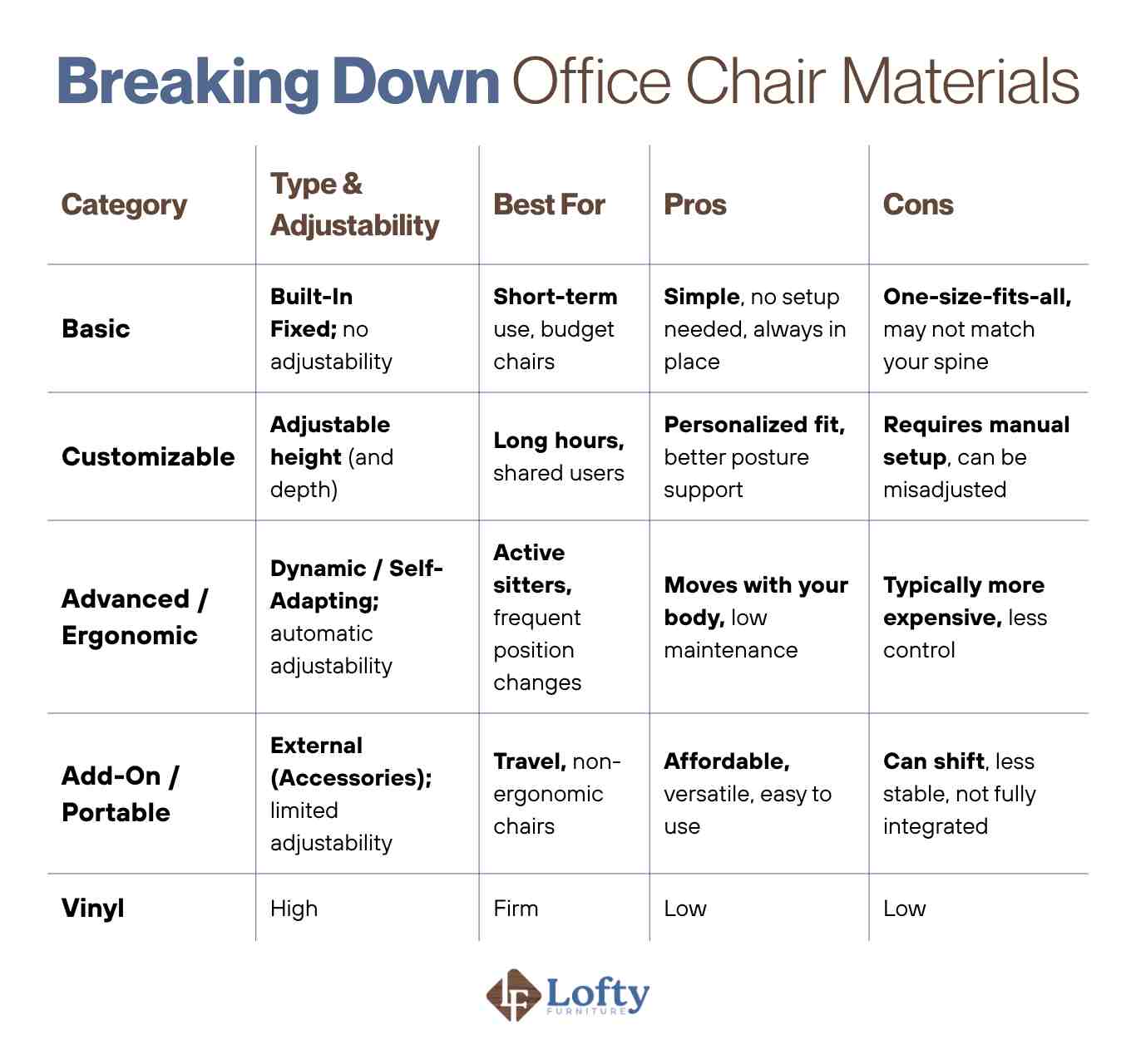
There are four main types of lumbar support in ergonomic office chairs, each suited for different needs, budgets, and sitting habits.
Built-In Fixed Lumbar Support
This is the most basic form of lumbar support. The chair’s backrest is shaped with a slight inward curve to match the natural contour of your lower spine. There are no controls or adjustments. It’s simply part of the chair’s structure.
Adjustable Lumbar Support
Adjustable lumbar support gives you control over the position (and sometimes the depth) of the back support. You can typically move it up or down to match your lower back, and in higher-end chairs, you can fine-tune how far it protrudes.
Dynamic/Self-Adapting Lumbar Support
Dynamic lumbar support is designed to move with your body. Instead of staying in one fixed position, it adjusts automatically as you shift, recline, or lean forward. Some systems use flexible materials, while others rely on tension mechanisms that respond to your spinal movement.
External Lumbar Support (Accessories)
External lumbar supports are add-ons like seat cushions, lumbar pillows, or rolls that you place between your lower back and the chair. They’re commonly used with chairs that lack proper built-in back support or when extra reinforcement is needed.
Here’s a side-by-side comparison of the main types and how they perform across key factors:
Key Benefits of Proper Lumbar Support
What does lumbar support on a chair do? When it is properly positioned and suited to your body, the benefits go beyond basic comfort and directly impact how your body feels and performs throughout the day. Here’s how it makes a difference in day-to-day use.
Reduces Lower Back Pain and Enhances Comfort During Long Hours
By maintaining the spine’s natural curve, lumbar support helps distribute pressure more evenly instead of concentrating it on specific discs or muscle groups. This reduces the muscular strain that typically builds up during prolonged sitting. A systematic review found that back support can lead to statistically significant reductions in lower back pain, with participants also reporting improved comfort and quality of life.
Improves Sitting Posture and Supports Long-Term Spinal Health

Proper and adjustable lumbar support encourages a more neutral sitting posture without forcing you into a rigid position. Instead of slouching or rounding your lower back, your pelvis stays more stable, allowing the rest of your spine to stack naturally. Over time, this reduces compensatory habits that can lead to misalignment and chronic discomfort.
Boosts Productivity
When your back isn’t constantly shifting or aching, it’s easier to stay focused on tasks without needing frequent breaks to reset your posture. Research shows that improving workstation ergonomics can lead to measurable productivity gains, often in the range of 10% to 25%, depending on the ergonomic intervention. In simple terms, when your body is properly supported, you spend less energy managing discomfort and more energy staying productive.
Signs Your Office Chair Lacks Proper Lumbar Support
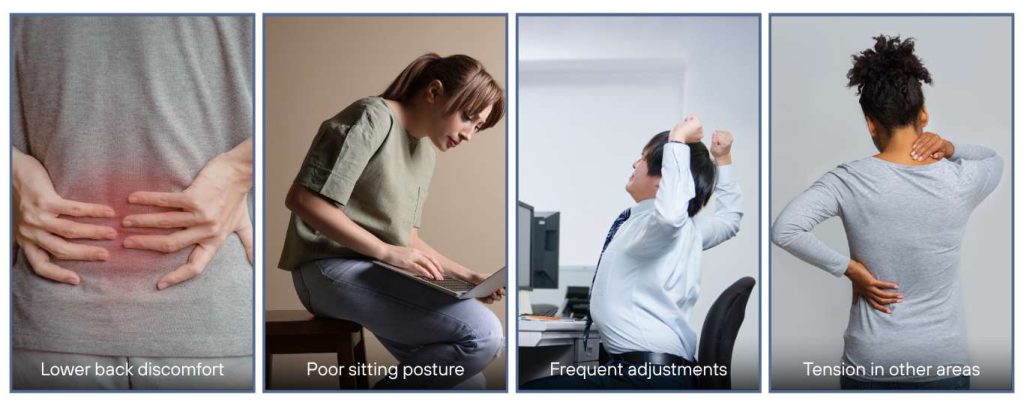
Understanding how to know if a chair has good lumbar support can help you identify whether your current setup is helping or hurting your posture. If your chair isn’t supporting your lower back correctly, you’ll often notice subtle (and sometimes not-so-subtle) signs building up over time:
- Lower back discomfort: You feel a dull ache or tightness in your lower back after sitting and standing often provides more relief.
- Poor sitting posture: You slouch or slide forward without realizing it. There may be a noticeable gap between your lower back and the chair.
- Frequent adjustments: You constantly shift or reposition yourself to get comfortable.
- Tension in other areas: Your shoulders, upper back, or neck start compensating for the lack of support. This leads to stiffness or fatigue.
How to Sit and Adjust Lumbar Support Correctly
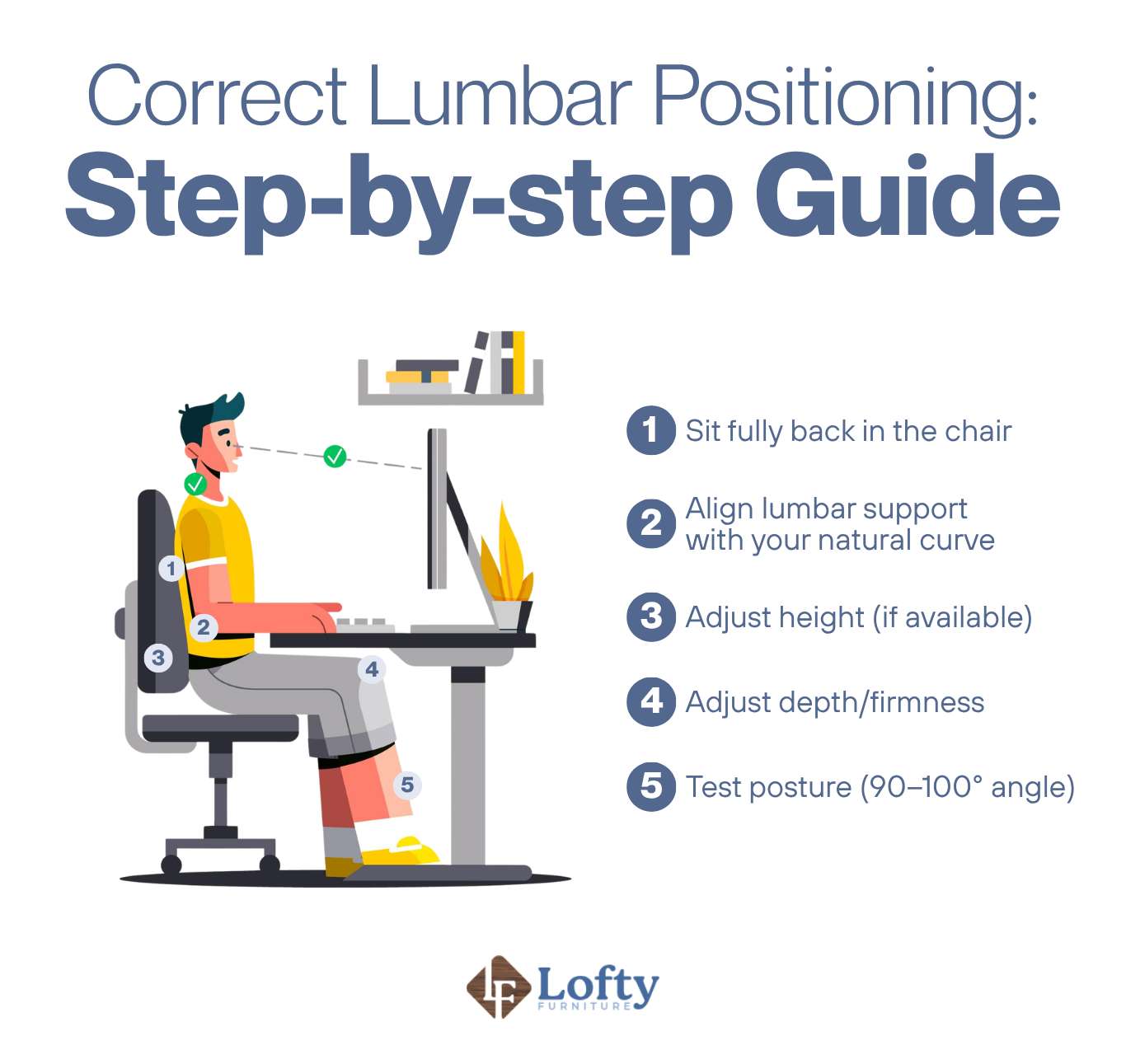
Even the best support won’t do much if it’s not positioned properly. Small adjustments can make a noticeable difference in how your back feels after a few hours of proper sitting in a chair. Here’s a step-by-step adjustment guide:
- Sit fully back in the chair: Make sure your hips are all the way against the backrest. This allows the lumbar support to actually reach your lower back.
- Align lumbar support with your natural curve: It should fit into the inward curve of your lower back, not your mid-back or hips.
- Adjust height (if available): Move the support up or down until it sits comfortably in the small of your back.
- Adjust depth/firmness: Increase or decrease how far the support pushes into your back. It should feel supportive without forcing your spine into an exaggerated arch.
- Test posture (90–100° angle): Slightly recline your ergonomic office chair so your backrest sits at about a 90–100° angle. Your shoulders should be relaxed, feet flat on the floor, and your lower back consistently supported without effort.
When Lumbar Support Is Essential & When It May Not Be Needed
Lumbar support becomes essential if you spend long hours sitting, especially in a fixed position. Office workers, remote professionals, and anyone dealing with recurring lower back discomfort tend to benefit the most. It’s also particularly helpful if your chair encourages slouching or if you notice fatigue building up in your lower back before the day ends.
That said, lumbar support isn’t always necessary for everyone. If you’re highly active throughout the day, frequently changing positions, or using alternative setups like standing desks or active seating, your body may not rely as heavily on built-in support. Some people also prefer minimal support if they already have strong posture habits and no history of back pain.
Lumbar Support Alternatives (If Your Chair Doesn’t Have It)
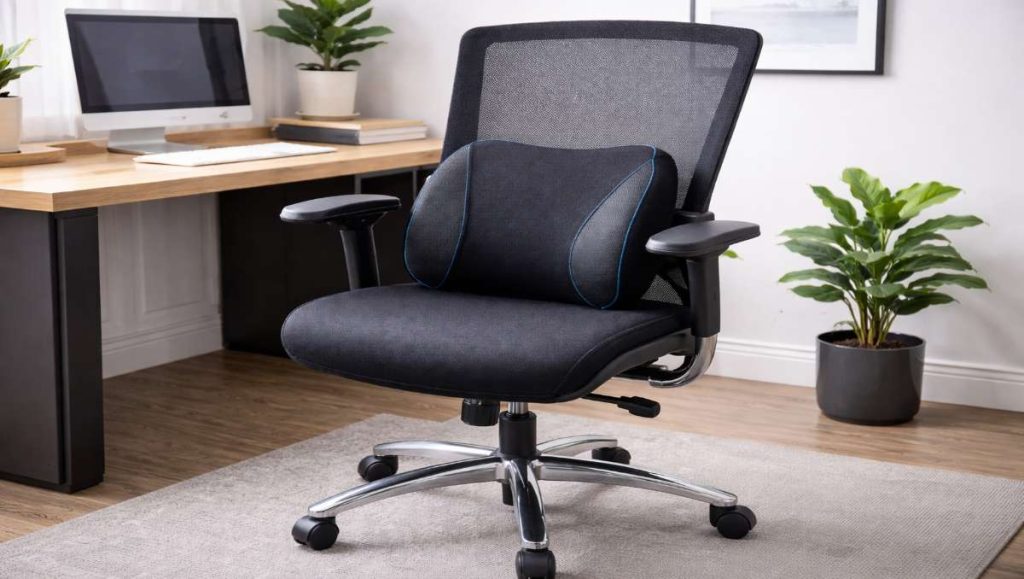
Not every chair comes with built-in support, but that doesn’t mean you’re stuck with poor posture. There are simple and effective ways to add support using everyday items or affordable accessories.
- Support cushions: Seat cushions that strap onto your chair and provide consistent lower back support
- Memory foam back pillows: Contour to your spine and offer a more customized feel
- Rolled towel or blanket: A quick DIY fix that can mimic the natural curve of your lower back
- Seat wedges: Tilt your pelvis slightly forward, encouraging a more natural spinal position
- Ergonomic backrests: Full back supports that attach to your chair for more structured alignment
Upgrade your ergonomic-friendly workspace today with our collection of ergonomic chairs, designed to provide the targeted comfort your spine deserves.
Final Thoughts: Is Lumbar Support Really Necessary?
Lumbar support helps maintain the natural curve of your lower spine. It reduces strain and makes long periods of sitting more comfortable. For most people who sit for extended hours, it is highly beneficial, though not always essential. If you are comfortable, pain-free, and move regularly, you may rely on it less. The goal is not perfect posture, but giving your body the support it needs to stay comfortable and functional over time.
Frequently Asked Questions
What does good lumbar support feel like?
Good lumbar support should feel subtle but noticeable. It gently fills the natural curve of your lower back without pushing you forward or forcing an exaggerated arch. You should feel consistent contact that makes sitting feel easier and more stable over time.
Should an office chair have lumbar support?
Yes, an office chair should have lumbar support because it helps maintain the natural curve of the lower spine. This reduces strain on the back muscles, improves posture, and helps prevent discomfort.
What happens if lumbar support is too high?
If lumbar support is positioned too high, it can push against the mid or upper back instead of the lower spine. This may lead to poor posture, discomfort in the upper back or shoulders, and reduced effectiveness of the support since it is not aligned with the natural lumbar curve.
Is lumbar support good or bad?
Lumbar support is generally good when it is properly designed and correctly positioned. It helps promote healthy posture, reduces lower back strain, and improves comfort. However, if it is poorly adjusted or does not match the user’s body, it can feel uncomfortable or ineffective.
Where is the best place for lumbar support on a chair?
The best place for lumbar support is in the lower back area, typically aligning with the natural inward curve of the spine just above the waistline. It should fill the gap between your lower back and the chair backrest without forcing your spine into an unnatural position.