
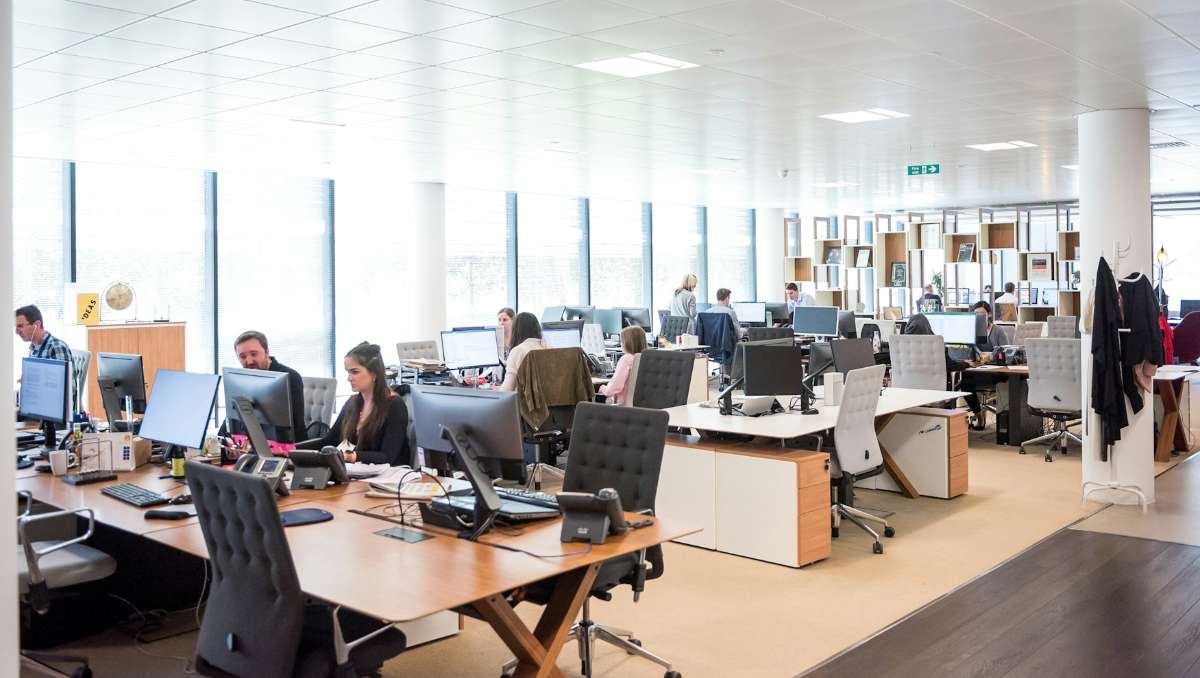
Most people think improving productivity at work requires big changes. In reality, some of the most effective suggestions for a better workplace start with something much simpler: the desk. Because it’s where most work actually happens, the design and setup of a desk quietly influences focus, posture, comfort, and even stress levels throughout the day.
Key Takeaways
- Simple suggestions for a better workplace often start with smarter desk design, optimizing desk height, lighting, and organization.
- Small desk adjustments include reducing clutter, adding ergonomic accessories, and incorporating natural elements.
- Daily habits such as maintaining proper posture reinforce good desk design.
In this guide, we’ll explore practical ideas and suggestions for a better workplace through smarter desk design.
Why Desk Design Matters in the Modern Workplace

Desk design plays a bigger role in performance development than many people realize. The physical environment where employees work directly affects focus, comfort, and efficiency throughout the day. For example, studies have found that employees with access to better-designed environments and natural lighting reported productivity gains of about 18%.
There are also important health implications tied to desk design. Poor workstation ergonomics can lead to awkward posture and long-term physical discomfort. Research shows that 20–60% of office workers experience musculoskeletal disorders related to workplace conditions such as poor seating and desk height. When desks are designed to support proper posture and movement, they help reduce these risks while making it easier for people to work comfortably.
Flexible and Smarter Desk Designs for Modern Workplaces
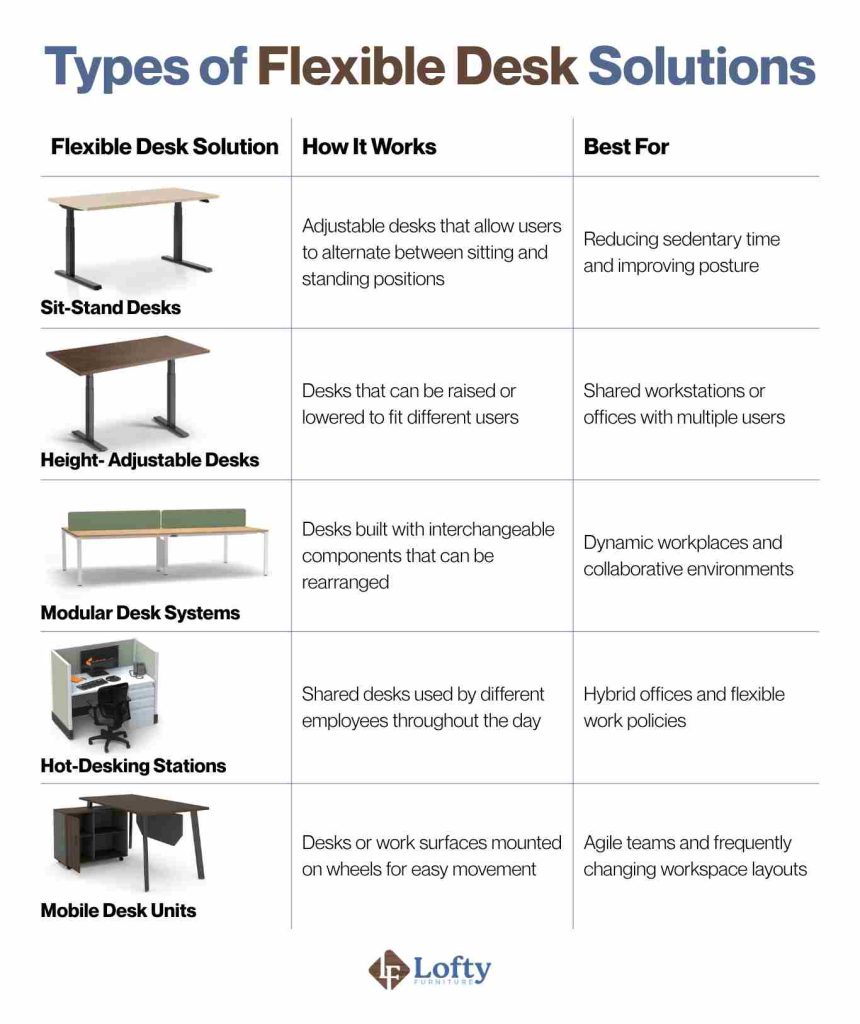
Modern workplaces increasingly benefit from flexible desk setups that allow employees to change how they work throughout the day. Below highlights common types of flexible desk solutions and how they support modern work environments.
Sit-Stand Desks
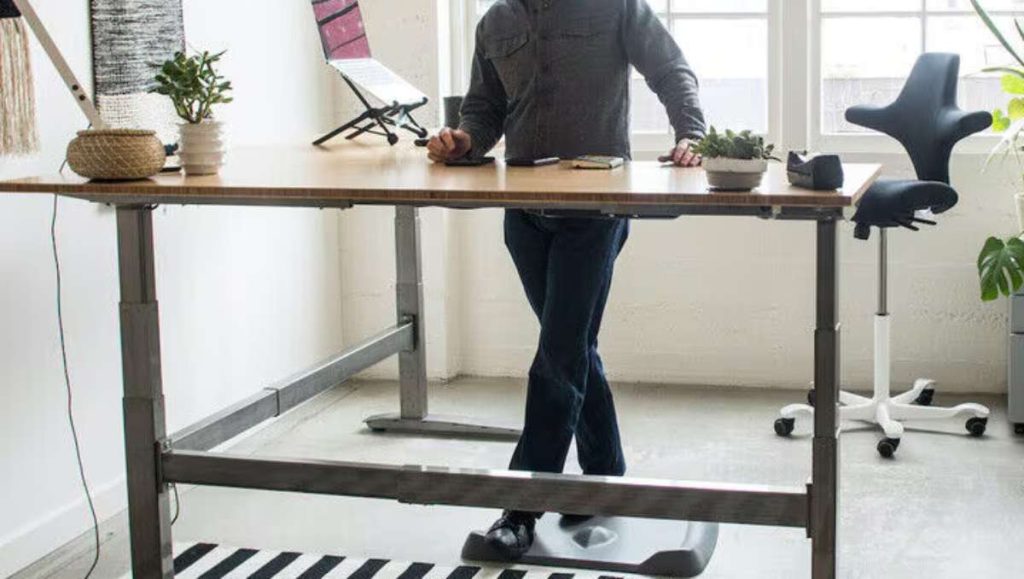
Sit-stand desks allow users to alternate between sitting and standing throughout the workday. Research suggests that office workers should stand or move for 2–4 hours during the workday to counteract the health risks of prolonged sitting. Flexible standing desks make this movement far easier to incorporate naturally into a routine.
Height-Adjustable Desks
Height-adjustable desks are designed to accommodate different users by allowing the desk surface to be raised or lowered to the ideal working height. This makes them especially useful in shared workspaces where multiple employees use the same workstation throughout the day.
Modular Desk Systems
Modular desk systems consist of interchangeable components that can be rearranged or expanded depending on employee needs. These desks often include detachable surfaces, storage units, and partitions that can be configured in multiple ways.
Hot-Desking Stations
Hot-desking stations are shared desks that employees use on a rotating basis rather than having permanently assigned workstations. This setup is commonly used in hybrid work arrangements where employees alternate between remote work and in-office.
Mobile Desk Units
Mobile desk units are work surfaces or desks equipped with wheels or casters, allowing them to be moved easily within the workspace. These desks are particularly useful in workplace environments where teams frequently change locations or need flexible collaboration areas.
Here’s a summary of flexible desk solution types for comparison:
Easy Ways to Improve Your Workspace with Desk Design
The most practical suggestions for a better workplace culture come from small adjustments to the desk itself. Below are several simple desk-centered changes that can help create a more comfortable, efficient, and supportive workplace environment.
1. Optimize Your Desk Height for Better Ergonomics
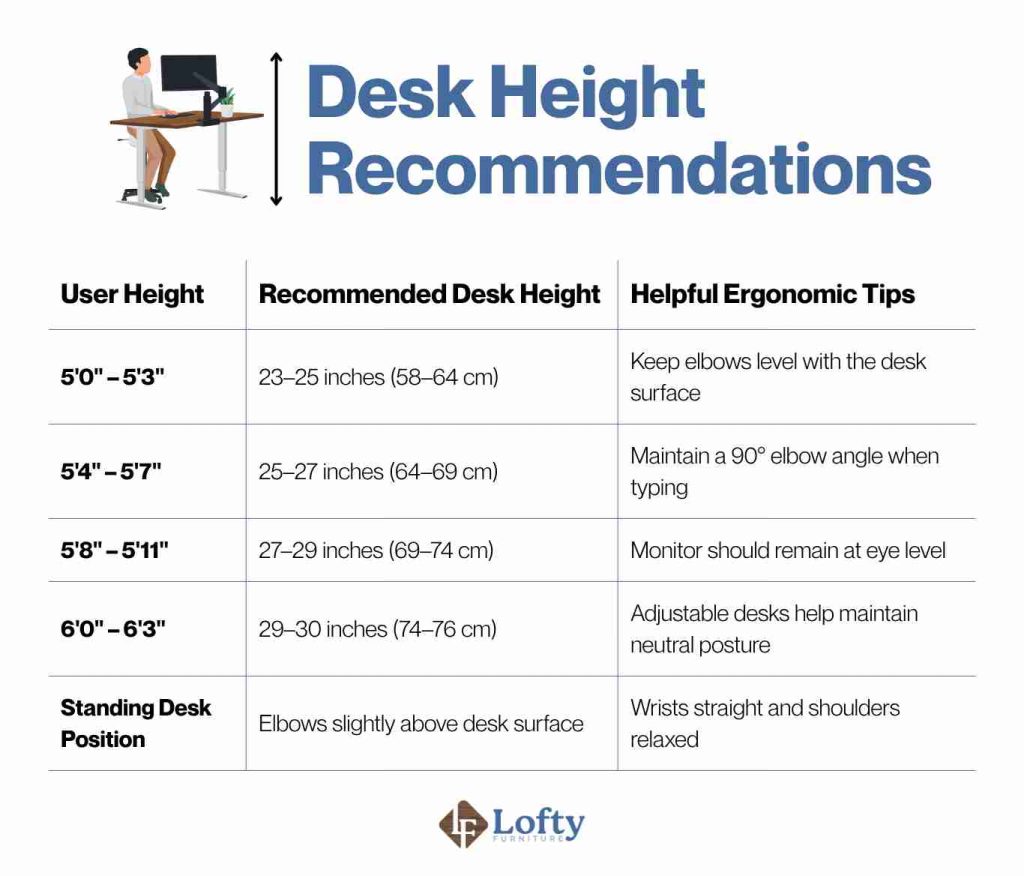
Instead of relying on a “standard” desk height, adjust your setup so your body stays in a neutral position throughout the day. Start by adjusting your chair so your feet are flat on the floor, then position your desk or keyboard so your elbows form roughly a 90-degree angle when typing.
Because people vary widely in height, there is no single “perfect” desk height for everyone. The guidelines below provide general ranges that help maintain neutral posture during seated work.
2. Clear Your Desk With a “Daily Reset System”
Clutter can build up quickly, but a simple system helps keep it under control. Keep only essential items within arm’s reach, and store everything else away so your desk stays functional instead of crowded. At the end of each day, spend about two minutes resetting your desk so it’s clean and ready for the next session. Over time, it also helps you stay mentally organized since you’re not starting each day in a mess.
3. Improve Lighting Where You Actually Work
A study found that office workers with exposure to natural daylight experienced better sleep quality and reported higher overall well-being than those in windowless environments. Position your desk near natural light whenever possible, but avoid direct glare on your screen by adjusting angles or using blinds. If natural light is limited, a well-placed desk lamp can help reduce eye strain and make your setup more comfortable for long hours. When your lighting is right, your entire workspace feels easier to use.
4. Add One Ergonomic Upgrade at a Time
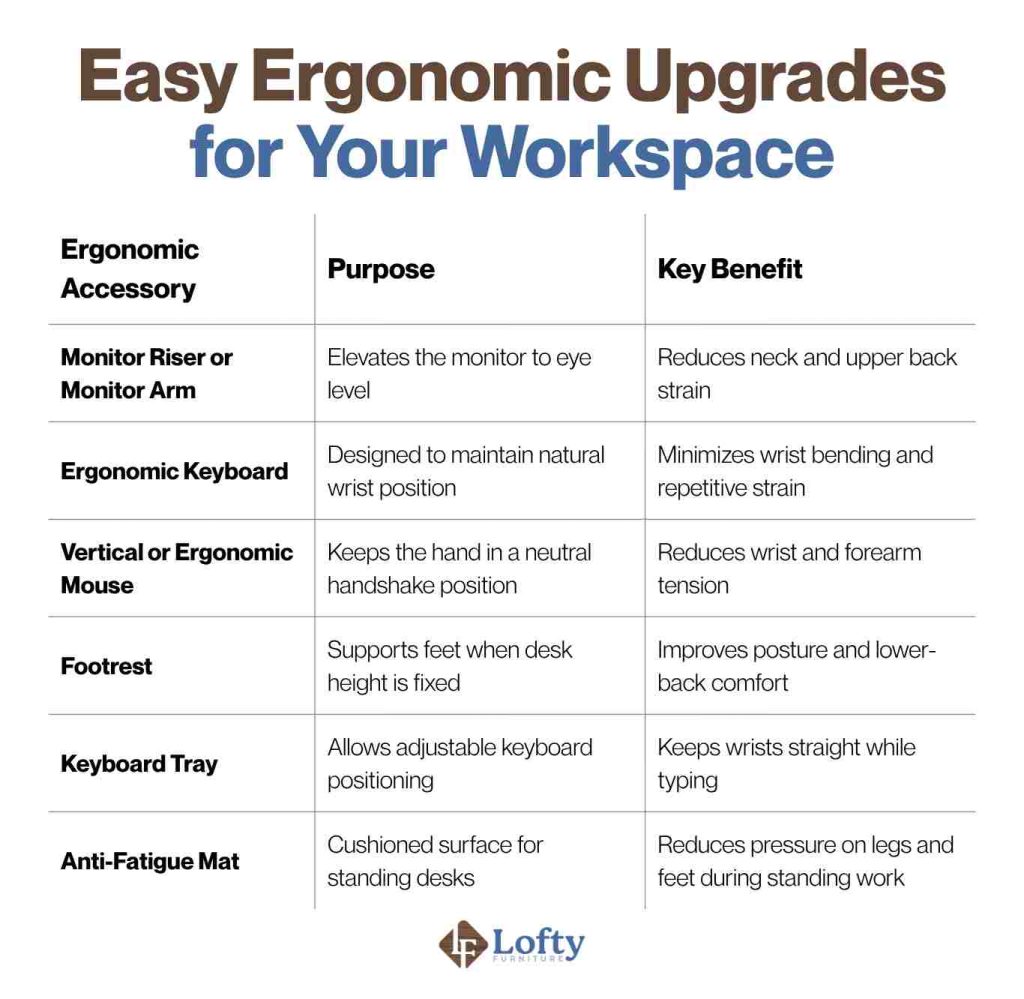
You don’t need to upgrade everything at once. Start with the area that causes the most discomfort. If you experience neck strain, add a monitor riser or arm to bring your screen to eye level. If your wrists feel strained, consider switching to an ergonomic keyboard or mouse. Focus on fixing the issue you feel most at the end of the day.
The table below outlines common accessories and the benefits they provide:
5. Incorporate Biophilic Elements for a Calmer Workspace
Adding a small natural element can make your workspace feel more comfortable and inviting. Consider placing a low-maintenance plant, such as a snake plant or pothos, on your desk to introduce a touch of greenery and improve air quality. Even small additions like this can reduce stress and make your office feel less sterile, creating an environment where focus comes more naturally.
Optional Upgrade: Choose Materials That Feel Good Long-Term
If you’re upgrading your desk, prioritize materials that improve both durability and everyday comfort. Solid wood desks not only offer long-term stability but also provide a natural texture that feels better to touch and work on compared to laminated alternatives. Investing in a desk made from high-quality materials reduces the risk of wobble, scratches, or wear, supporting consistent productivity over years.
Elevate your productivity and bring biophilic elements to your home office by investing in one of our Amish wooden desks.
Conclusion: Smarter Desk Design for a Better Workplace
A better workplace does not always require large changes or expensive renovations. It often starts at the desk, where small improvements in layout, ergonomics, lighting, and organization can reduce daily friction and improve comfort and focus. Thoughtful desk design supports both well-being and productivity through simple upgrades like adjustable desks, proper monitor placement, and organized surfaces, helping maintain good posture and reduce strain. When combined with healthy habits, these changes create a workspace where people can stay comfortable, focused, and perform at their best.
Frequently Asked Questions
How to make your work desk better?
Improving a work desk often starts with simple adjustments. Keep frequently used items within easy reach, position the monitor at eye level, and maintain a clutter-free surface to reduce distractions. Adding ergonomic accessories can also improve posture and comfort.
How to work smarter in the workplace?
A well-designed desk setup supports focus and efficiency by minimizing discomfort and distractions. Taking regular movement breaks, organizing tasks clearly, and maintaining a clean workspace can also improve productivity.
What is the ideal desk setup for maintaining proper ergonomics?
An ideal ergonomic desk setup keeps the body in a neutral and comfortable position. The monitor should be at eye level, elbows should rest at roughly a 90-degree angle while typing, and wrists should remain straight. Feet should rest flat on the floor or on a footrest, while the chair supports the lower back.
What makes a good work desk?
A good work desk provides enough surface space for your monitors and essentials, offers stability to support your equipment, and includes features like cable management or storage to keep your workspace organized. Ergonomics and durability are also key, ensuring comfort and long-term use.