

A lot of people try to organize their desks by buying more desk organizers and storage bins. Then a few weeks later, the clutter returns and the workspace feels chaotic again. The reason is simple. Organization is usually a setup problem. The best desk organization ideas begin with designing a workspace that naturally supports how you work every day. When your desk setup matches your workflow, staying organized requires less effort and becomes part of the system itself.
Key Takeaways:
- The best desk organization ideas start with the right desk setup, not more storage accessories.
- Creating dedicated zones, proper ergonomics, and cable management helps prevent clutter before it starts.
- A combination of digital workflows and simple maintenance habits keeps your workspace organized.
Why Choosing the Right Desk Matters for Organization
Before organizing anything, you need a desk that fits how you actually work. A setup for gaming, creative work, remote meetings, or admin tasks all have different space and layout needs. When the desk matches your workflow, it naturally reduces clutter by giving everything a logical place.
Most organization problems start when people try to force their workflow onto a desk that wasn’t designed for it. If the surface is too small or lacks proper storage, monitor placement, or cable management, clutter builds up no matter how many organizers you use. Choosing the right desk early removes that friction and makes long-term organization much easier.
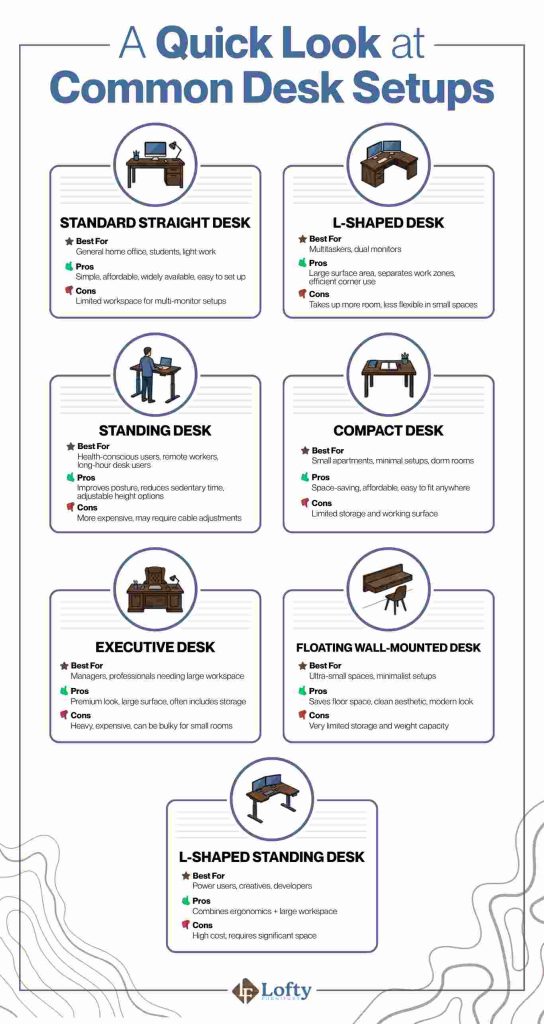
Different desk styles support different work habits. Here’s a quick comparison to help identify which setup may work best for you:
Best Desk Organization Ideas for a More Productive Desk Setup
An organized desk is created by building a system where every item has a purpose and a place. The following ideas focus on creating a setup that stays organized naturally instead of requiring constant cleanup.
1. Define Desk Zones Before Placing Anything
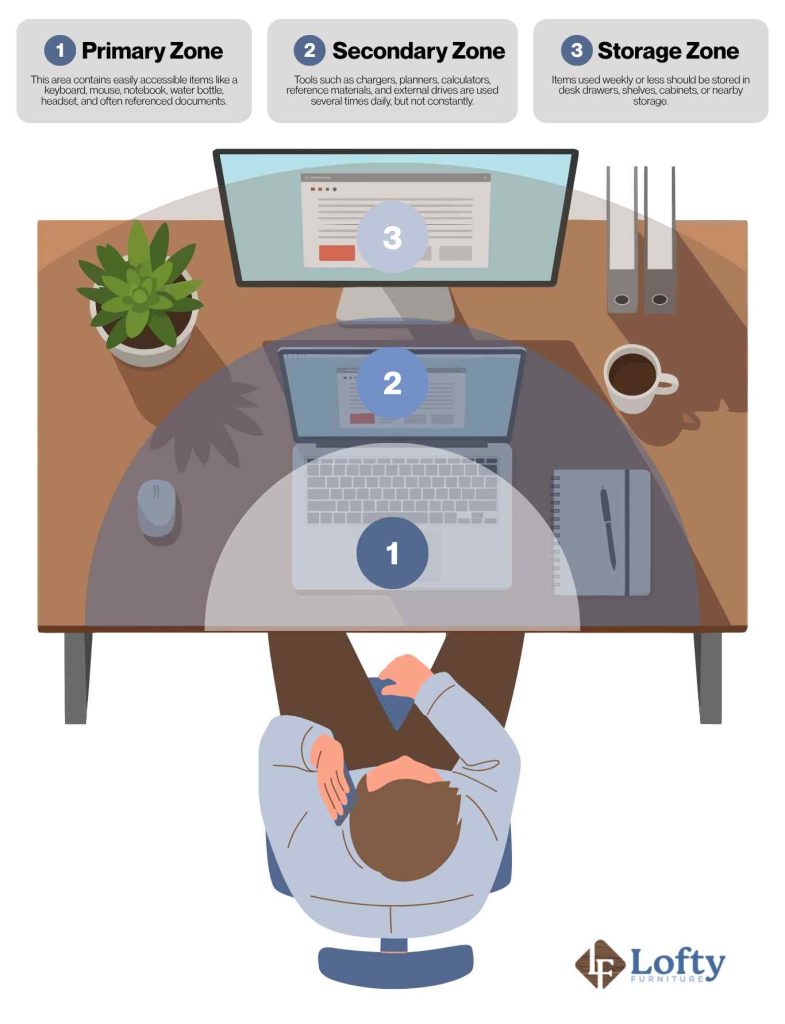
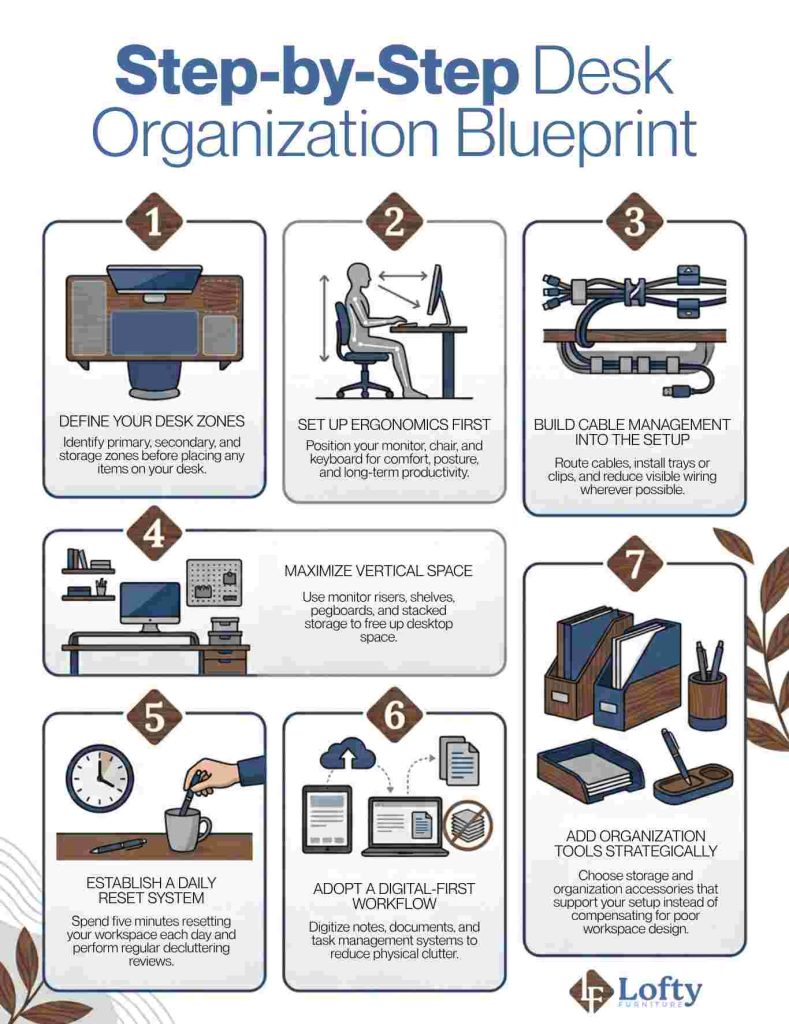
One of the most effective organization strategies is dividing your workspace into functional zones before placing a single item on the desk.
- Primary Zone (Daily Tools): This is the area directly within arm’s reach. Think keyboard, mouse, notebook, water bottle, headset, or frequently referenced documents.
- Secondary Zone (Occasional Tools): These are tools used a few times throughout the day but not continuously. Chargers, planners, calculators, reference materials, and external drives often fit well in this space.
- Storage Zone (Rare Use Items): Anything used weekly or less frequently should move into desk drawers, shelves, cabinets, or nearby storage.
2. Maximize Space with Smart Storage and Cable Management
An organized desk isn’t just about putting things away; it’s about reducing visual clutter. Use vertical storage solutions like monitor risers, shelves, pegboards, and wall organizers to free up valuable desk space while keeping supplies accessible. At the same time, incorporate cable management into your setup by routing cords behind monitors or under the desk with cable trays and adhesive clips. If possible, use wireless accessories selectively to further reduce cable clutter while maintaining the performance you need.
3. Build a System That’s Easy to Maintain
The best organization system is one you can maintain with minimal effort. Choose storage tools that fit your workspace rather than trying to fix a poor layout with more organizers. A minimal desk setup may only need a monitor riser and cable tray, while larger workstations may benefit from drawer dividers or shelving. Support your system with a digital-first workflow by using note-taking apps, cloud storage, and task managers to reduce paper clutter. Finally, spend five minutes at the end of each day resetting your desk, complete a quick weekly declutter, and review your setup monthly to keep it aligned with your workflow.
Ready to transform your workspace from chaotic to creative? Invest in the right desk tidiness accessories today to clear the clutter and instantly boost your daily productivity.
Conclusion: Create a Desk That Stays Organized
The most effective desk organization ideas are the ones that require the least effort to maintain. Instead of constantly organizing, focus on building a setup that naturally supports your workflow. When your desk, ergonomics, storage, and habits work together, organization becomes passive rather than active. The result is a workspace that stays cleaner, feels more productive, and helps you focus on the work that matters most.
Frequently Asked Questions
What desk setup is best for productivity and focus?
The best desk setup depends on your workflow, but most productive desks share a few common traits. They prioritize ergonomics, minimize distractions, keep frequently used tools within reach, and maintain clear desk space for focused work.
How often should I reset or reorganize my desk setup?
A quick five-minute reset at the end of each day helps prevent clutter from building up. Weekly reviews and monthly reorganizations are usually enough to maintain an efficient workspace.
How do I keep my desk organized if I have a small workspace with no drawers?
Focus on vertical storage solutions such as monitor risers, wall shelves, pegboards, and laptop stands. Defining clear desk zones and limiting desktop items to daily essentials also helps maximize available space.
What are the most essential desk tidiness accessories I should invest in first?
Start with accessories that solve the biggest sources of clutter. For most people, this includes a monitor riser, cable management system, drawer organizer, and laptop stand. These tools typically provide the greatest impact with minimal investment.